
Code to Flow
CodeToFlow AI Tool visualizes complex code logic using interactive flowcharts, promoting collaboration and efficiency across multiple programming languages
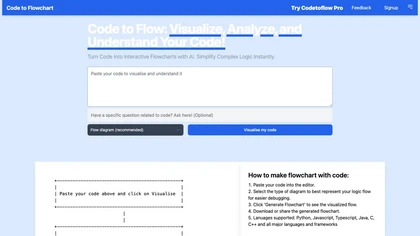
AI-Powered Tool to Visualize and Understand Complex Code with Interactive Flowcharts
Overview
CodeToFlow is an innovative AI-powered platform that converts code into clear, interactive flowcharts, enabling developers, students, and teams to visualize and analyze complex logic easily. Supporting all major programming languages like Python, Java, JavaScript, and C++, it analyzes code structure to generate flow diagrams, sequence diagrams, and class diagrams. Users can customize color schemes, export diagrams as SVG, PNG, or PDF, and explore code logic interactively. The platform simplifies debugging, accelerates onboarding, and improves team collaboration by providing visual representations of code behavior. With features like code path identification, logical flow understanding, and multiple diagram options, CodeToFlow makes deciphering intricate code structures straightforward. The platform also offers a Pro version with unlimited visualizations, extended code capacity, custom branding, and priority support, catering to professional developers and organizations looking for scalable solutions. Whether for personal learning, project management, or team collaboration, CodeToFlow bridges the gap between complex coding and visual comprehension, boosting productivity and code quality.
Key features & benefits
Supports all major programming languages including Python, JavaScript, Java, C++
Generates interactive flowcharts, sequence diagrams, and class diagrams
Identifies code paths and logic flows for easier debugging
Customizable themes and color schemes
Export diagrams as SVG, PNG, or PDF for easy sharing
Supports unlimited code visualizations with Pro plan
Simplifies complex nested structures and control flows
Enhances team collaboration and code explanation
Use cases & applications
Visualizing code logic for personal projects and learning
Creating documentation and flowcharts for software architecture
Team collaboration and code reviews
Explaining code to non-technical stakeholders
Educational purposes for teaching programming concepts
Project planning and task management in development teams
Who it's for
Side hustle idea
A way you could turn this tool into income
Leveraging CodeToFlow as a service can open opportunities for freelance developers and coding tutors to offer code visualization and debugging services. Creating tutorials, courses, or consultancy around code comprehension using this tool can attract clients seeking quick and clear code explanations. Resellers or integrators can bundle this platform with educational programs or corporate training packages, generating recurring revenue. Additionally, developing custom plugins or extensions tailored for specific industries or coding environments can diversify income streams. The increasing demand for code documentation and efficient debugging makes this a valuable asset for solo entrepreneurs and small agencies aiming to provide scalable, high-quality programming support and educational content.
Reviews
0.0
from 0 reviews
No reviews yet — be the first to share your experience.